
Fill-in-the-blank questions are automatically graded in Tomagrade (similar to closed questions) and they look like this:

Below the word the student completed, an underline will appear (meaning the student's answer will appear underlined).
If the student answered correctly, the answer text will be colored green.
If the student answered incorrectly, the answer text will be colored red.
If a student did not answer the question, the text "The student did not answer the question" will be displayed.
In the grade array on the left side, you can see the grade automatically assigned to the student's answer (according to the answer defined by the lecturer when building the exam) and the word "Detected", which indicates that the question was graded automatically, similar to a closed question:
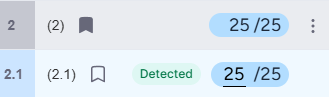
* Fill-in-the-blank questions are created in Tomagrade with an additional sub-item — meaning that if a single fill-in-the-blank question was created in the exam editor, sub-item 1.1 will be created in Tomagrade. This means the question will appear within a section.
* It is possible to manually edit the answer grade on the left side, thereby updating the grade (if you wish to change the answer's grade).
* If there are multiple words to complete in a single question, all of the student's answers will appear in Tomagrade in a numbered format — (1), (2), (3)...
For a guide on creating fill-in-the-blank questions, click here.